Office Ergonomics
Updated 2026-08-06
In this bundle Manual Handling & Body Mechanics
Print-ready PDF
Download this talk as a print-ready PDF, available in 4 languages.
On a construction project the office is where the trailer is — the site office, the field trailer, the desk where the paperwork, the scheduling, the estimating, and the safety admin get done. It is easy to think of it as the safe part of the job, the place you go when you are not exposed to anything. This office ergonomics talk is about why that is wrong, and about a way of seeing the desk that changes how you treat the eight hours you spend at it.
Here is the distinction that carries this whole talk: the office is a worksite too, and the chair is the exposure. The injuries you get at a desk are the same musculoskeletal disorders you get in the field — the same strained tendons, pinched nerves, and aching necks and shoulders — just produced more slowly and more quietly, by a monitor at the wrong height and a keyboard that bends your wrists, held for hours. And the twist that most people miss is this: the best-adjusted workstation in the building still injures you if you hold it still all day. A perfect chair, a perfect monitor height, and perfect wrist alignment do not protect you if you sit motionless in that perfect posture for four hours straight. Once you see that, office ergonomics stops being about buying the right chair and becomes about two things together — set the workstation to neutral, and keep moving out of it.
Where the boundary of this talk sits#
The general ergonomics talk owns ergonomics broadly across all kinds of work. The eye strain talk owns the eyes and the screen — glare, focus, the 20-20-20 rule. The proper-lifting talk owns lifting, and the repetitive strain talk owns the cumulative-injury mechanism itself, wherever it happens. This talk owns the office and the seated computer workstation as a worksite — the chair, desk, monitor, keyboard, and mouse geometry, and the hazard of prolonged static sitting. Where the question is the eyes, a lift, or the injury mechanism in the abstract, those talks own it; this one owns the desk you are sitting at and how it is set up.

The same injuries, produced from a chair#
It is worth being clear about what actually goes wrong at a desk, because it does not feel like an injury while it is happening. The medical name is the same as everywhere else — a musculoskeletal disorder (MSD), an injury of the muscles, nerves, tendons, ligaments, and joints — and the office produces a familiar set of them: neck and shoulder pain from a screen at the wrong height, wrist and forearm problems from a bad keyboard and mouse position, and lower-back pain from a chair that gives no support. The mechanism is exactly the one from the repetitive strain talk: hold a joint away from neutral, or repeat a small motion, for long enough and the tissue breaks down faster than it recovers.
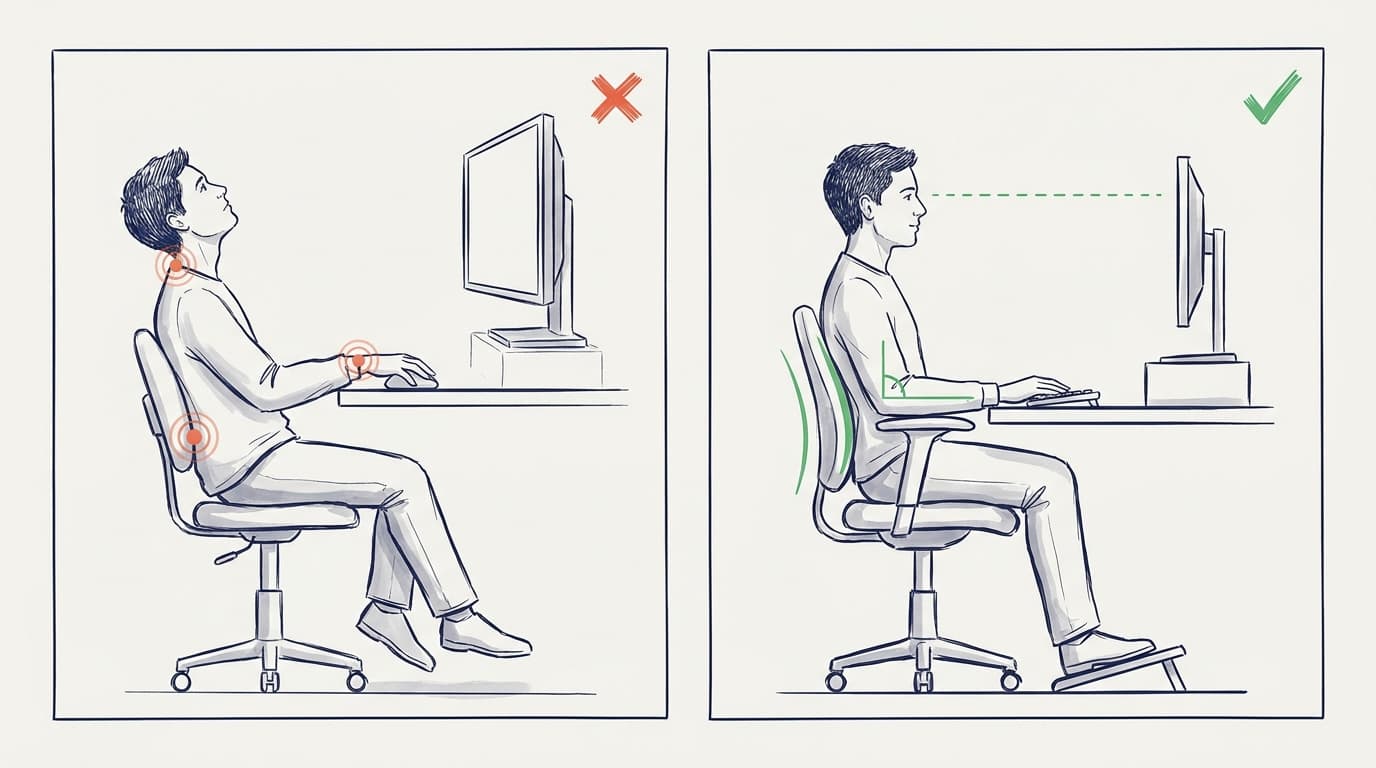
The components drive it in specific, traceable ways. A monitor positioned too high makes you tilt your head back, which fatigues the neck and shoulder muscles that hold your head up. A keyboard that is too low makes you bend your wrists at extreme angles, which forces the finger tendons to bend around the bones of the wrist — the direct path to wrist and hand problems. A mouse placed too far away pulls your elbow away from your body and makes you hold your arm out in an elevated position for long stretches. A chair with no lumbar support lets the lower back slump out of its natural curve. None of these is dramatic on any given afternoon, which is exactly why it is dangerous: the damage is invisible until it is established, and the early aches are easy to write off as just being tired.
Neutral posture: what "set up right" actually means#
There is a concrete target for a workstation, and OSHA lays it out in its Computer Workstations guidance. The goal is neutral posture — the position where your joints are naturally aligned and the stress on muscles and tendons is lowest. In practice that means: head level and facing forward, in line with the torso, not tilted or twisted. Shoulders relaxed, upper arms hanging naturally at your sides. Elbows close to the body, bent between about 90 and 120 degrees. Wrists and forearms straight and roughly parallel to the floor, not bent up, down, or to the side. Back fully supported with lumbar support, torso vertical or leaning back slightly. Thighs roughly parallel to the floor, knees about hip height, and feet fully supported by the floor or a footrest.
You reach that target by adjusting the workstation to you, not the other way around. Set the chair first — height so your feet are supported and your thighs are level, with lumbar support in your lower back. Set the keyboard and mouse at the height where your elbows are at about 90 degrees and your wrists stay straight, keeping the mouse right next to the keyboard so you are not reaching. Set the monitor last — top of the screen at or slightly below eye level, about an arm's length away, directly in front of you so you are not turning your head to read it. If the desk height cannot change, a footrest, a keyboard tray, or a monitor riser does the same job. The point of all of it is a single idea: arrange the equipment so your body can stay in neutral without effort.
The part people miss: neutral is not enough#
Here is where office ergonomics surprises people. You can do everything above perfectly and still hurt yourself, because holding any posture still for a long time is itself a hazard — OSHA says so directly: regardless of how good your working posture is, sitting still or working in the same posture for prolonged periods is not healthy. A static posture, even a neutral one, fatigues the muscles that hold it, and sitting motionless slows circulation and stiffens the very joints you carefully aligned. This is the reason a standing desk is not a magic fix either — prolonged static standing brings its own problems. The variable that matters is not sitting versus standing; it is movement versus stillness.
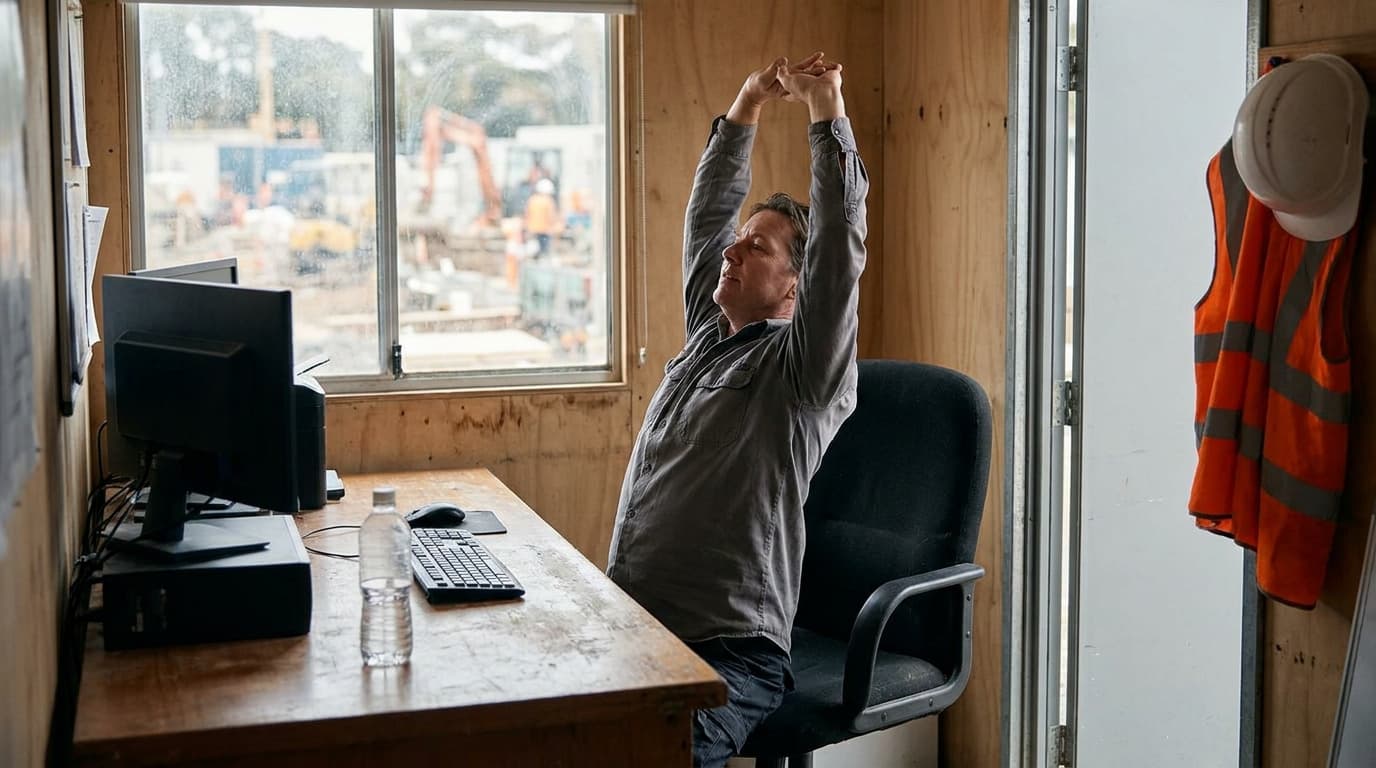
So the second half of office ergonomics is as important as the setup, and it is the half that gets skipped: change posture regularly and get up. The practical rule that works is to break up long stretches every 30 to 60 minutes — stand, stretch, walk to the printer, get water, take a call on your feet. Vary between sitting upright, leaning back, and standing if you have a sit-stand desk. Look away from the screen and roll the shoulders and wrists. None of this requires equipment, which is why it is the most cost-effective control there is — and the easiest to forget. The mental model to carry out of this talk is that posture is not a position you achieve once; it is movement you keep doing. The fix is the next posture, not the perfect one.
Catch it early — the office hides the signs#
Because the office feels safe and nothing "happens," the early warning signs get ignored even more than they do in the field. The signs are the same ones from the repetitive strain talk: aching, tingling, numbness, stiffness, or weakness in the wrists, hands, forearms, shoulders, neck, or lower back, especially the kind that shows up during or after a long day at the desk and eases with rest. OSHA's own guidance makes the point plainly — without awareness, MSD signs and symptoms go unnoticed and unaddressed, and delays in detecting and reporting them lead to more severe injury. The single most valuable habit is to treat those early aches as information and act on them — adjust the setup, add movement, and raise it — while they still come and go. That is the window in which it is easy to fix.
Where the duty sits#
Office ergonomics sits in the same legal place as all ergonomics: the United States has no ergonomics standard — the one OSHA issued took effect in November 2000 and was repealed in early 2001 — so the duty runs through the General Duty Clause, Section 5(a)(1) of the OSH Act, which requires a workplace free of recognized hazards likely to cause serious harm. OSHA's Computer Workstations eTool is the recognized federal reference for what a good workstation looks like, and it is guidance, not a mandatory standard. General training and hazard-assessment duties under 1926.20 / 1926.21 apply, and on federal contract work EM 385-1-1 covers ergonomics within its health-hazard program. Some states — California, Minnesota, and Washington among them — have their own ergonomics rules that go beyond the federal baseline, so where a state rule or a contract sets a specific requirement, that requirement governs.
What can go wrong?#
- A monitor sits too high or off to the side, so the neck is tilted or twisted all day.
- A keyboard is too low or a mouse too far away, bending the wrists or holding the arm out for hours.
- A chair gives no lumbar support and the lower back slumps out of its natural curve.
- The workstation is set up perfectly — and then held motionless for hours with no movement breaks.
- A standing desk is used all day with no sitting, trading one static posture for another.
- Early aches and tingling are dismissed because "it's just desk work" and nothing happened.
- A laptop is used on its own for long periods, forcing a bent neck and cramped hands.
- Feet dangle with no support because the chair is too high and there is no footrest.
How do we manage this properly?#
- Treat the office as a worksite — the same MSDs happen here, just more slowly.
- Set the workstation to neutral posture — chair first, then keyboard and mouse, then monitor.
- Put the monitor top at or slightly below eye level, an arm's length away, directly in front.
- Keep elbows near 90 degrees and wrists straight, mouse next to the keyboard.
- Support the lower back with lumbar support and the feet with the floor or a footrest.
- Move regularly — break up sitting every 30 to 60 minutes; vary posture; stand and stretch.
- Remember neutral is not enough — stillness is a hazard even in a perfect setup.
- Report early aches and tingling and adjust while the problem still comes and goes.
Before you start#
- Confirm your monitor top is at or just below eye level and directly in front of you.
- Confirm your elbows sit near 90 degrees and your wrists stay straight at the keyboard and mouse.
- Confirm your chair supports your lower back and your feet are supported.
- Confirm the mouse is right next to the keyboard so you are not reaching.
- Confirm you have a way to break up long sitting — a reason to stand every 30 to 60 minutes.
- Confirm a laptop, if used for long periods, has a separate keyboard or riser to avoid a bent neck.
- Confirm you know the early warning signs and that raising them is expected.
- On federal work, confirm office ergonomics is covered in the site health-hazard program.
Talk it over#
- Is anyone here getting neck, shoulder, wrist, or lower-back aches after a long day at the desk?
- Look at your own setup — is the monitor at eye level, are your wrists straight, are your feet supported?
- What is your reason to get up — where is the natural break every half hour or so in your day?
- If you use a laptop for hours, what would it take to add a separate keyboard or a riser?
The bottom line#
The office is a worksite too, and the chair is the exposure. The injuries you get at a desk are the same musculoskeletal disorders you get in the field — strained tendons, pinched nerves, aching necks, shoulders, and lower backs — just produced more slowly and quietly by a monitor at the wrong height, a keyboard that bends your wrists, and a chair with no support, all held for hours. The setup target is neutral posture, and OSHA's Computer Workstations guidance is specific about it: head level and forward, shoulders relaxed, elbows near 90 degrees, wrists straight, back supported, feet supported, monitor top at or just below eye level an arm's length away. You reach it by adjusting the workstation to you — chair, then keyboard and mouse, then monitor. But the part people miss is the one that matters most: the best-adjusted workstation still injures you if you hold it still all day, because OSHA is explicit that sitting still or working in one posture for prolonged periods is unhealthy regardless of how good that posture is. A standing desk is not the fix either — the variable is movement versus stillness, not sitting versus standing. So office ergonomics is two things together: set the workstation to neutral, and keep moving out of it — break up sitting every 30 to 60 minutes, vary posture, get up. Because the office feels safe, the early warning signs — aching, tingling, numbness in the wrists, shoulders, neck, or lower back — get ignored even more than in the field, and OSHA warns that detection and reporting delays lead to more severe injury. The duty runs through the General Duty Clause 5(a)(1) and the Computer Workstations eTool, since the US has no ergonomics standard. The test for any desk is one question: is this workstation set to neutral — and am I actually getting out of it, or holding perfect posture perfectly still?
Frequently asked questions about office ergonomics#
Is an office really a worksite for injury purposes?
Yes. The injuries you get at a desk are the same musculoskeletal disorders — strained tendons, pinched nerves, and aching necks, shoulders, and lower backs — that happen in the field, just produced more slowly and quietly. A monitor at the wrong height, a keyboard that bends your wrists, and an unsupportive chair, held for hours, break tissue down faster than it recovers. The office feeling safe is exactly why the injuries sneak up on people.
What does a neutral workstation setup look like?
Head level and facing forward, in line with the torso; shoulders relaxed with upper arms hanging naturally; elbows close to the body, bent between about 90 and 120 degrees; wrists and forearms straight and roughly parallel to the floor; back supported with lumbar support; thighs about parallel to the floor with knees near hip height; and feet fully supported by the floor or a footrest. The monitor top sits at or slightly below eye level, about an arm's length away, directly in front of you.
In what order should I adjust things?
Chair first — set the height so your feet are supported and your thighs are level, with lumbar support in your lower back. Then the keyboard and mouse — at the height where your elbows are near 90 degrees and your wrists stay straight, with the mouse right next to the keyboard. Then the monitor last — top at or just below eye level, an arm's length away, directly in front. If the desk height cannot change, a footrest, keyboard tray, or monitor riser does the same job.
If my posture is good, why do I still need to move?
Because holding any posture still for a long time is itself a hazard. OSHA states directly that regardless of how good your working posture is, sitting still or working in the same posture for prolonged periods is not healthy. A static posture fatigues the muscles that hold it and slows circulation, even when the posture is neutral. That is why a standing desk is not a magic fix either — the variable that matters is movement versus stillness, so break up long stretches every 30 to 60 minutes.
Are standing desks better than sitting?
Not by themselves. A standing desk helps only if it lets you change posture; used to stand motionless all day, it trades one static posture for another and brings its own problems, like leg and lower-back fatigue. The benefit comes from alternating — sitting, standing, and moving through the day — not from standing as much as possible. Think in terms of variety and movement rather than one "correct" position.
What are the early warning signs at a desk?
Aching, tingling, numbness, stiffness, or weakness in the wrists, hands, forearms, shoulders, neck, or lower back — especially the kind that shows up during or after a long day at the desk and eases with rest. Because nothing "happens" in an office, these get ignored, but OSHA warns that when the signs go unnoticed, detection and reporting delays lead to more severe injury. Treat the early aches as information: adjust the setup, add movement, and raise them while they still come and go.
Download the office ergonomics toolbox talk PDF#
Get this office ergonomics toolbox talk as a print-ready PDF — available in English, Spanish, Portuguese, and Turkish. Print it, hand it to the crew, and collect signatures on the included attendance sheet.
Download the PDF — free account required. New members get 3 free downloads.
Related toolbox talks#
Sources#
- OSHA, Computer Workstations eTool — Good Working Positions (neutral posture; elbows 90–120°, feet supported, monitor at eye level): https://www.osha.gov/etools/computer-workstations/positions
- OSHA, Computer Workstations eTool — Work Process and Recognition (prolonged static posture fatigues muscles; MSD awareness and reporting): https://www.osha.gov/etools/computer-workstations/work-process
- OSHA, Ergonomics — Overview (MSDs, risk factors; no ergonomics standard, General Duty Clause enforcement): https://www.osha.gov/ergonomics
This talk is general awareness guidance for training purposes. It does not replace your employer's ergonomics or health-hazard program, a medical evaluation of symptoms, the OSH Act General Duty Clause, applicable state ergonomics rules, or a competent person's duties, and it is not medical or legal advice. If you are experiencing persistent symptoms, seek a medical evaluation.