Free template
Safety training matrix template
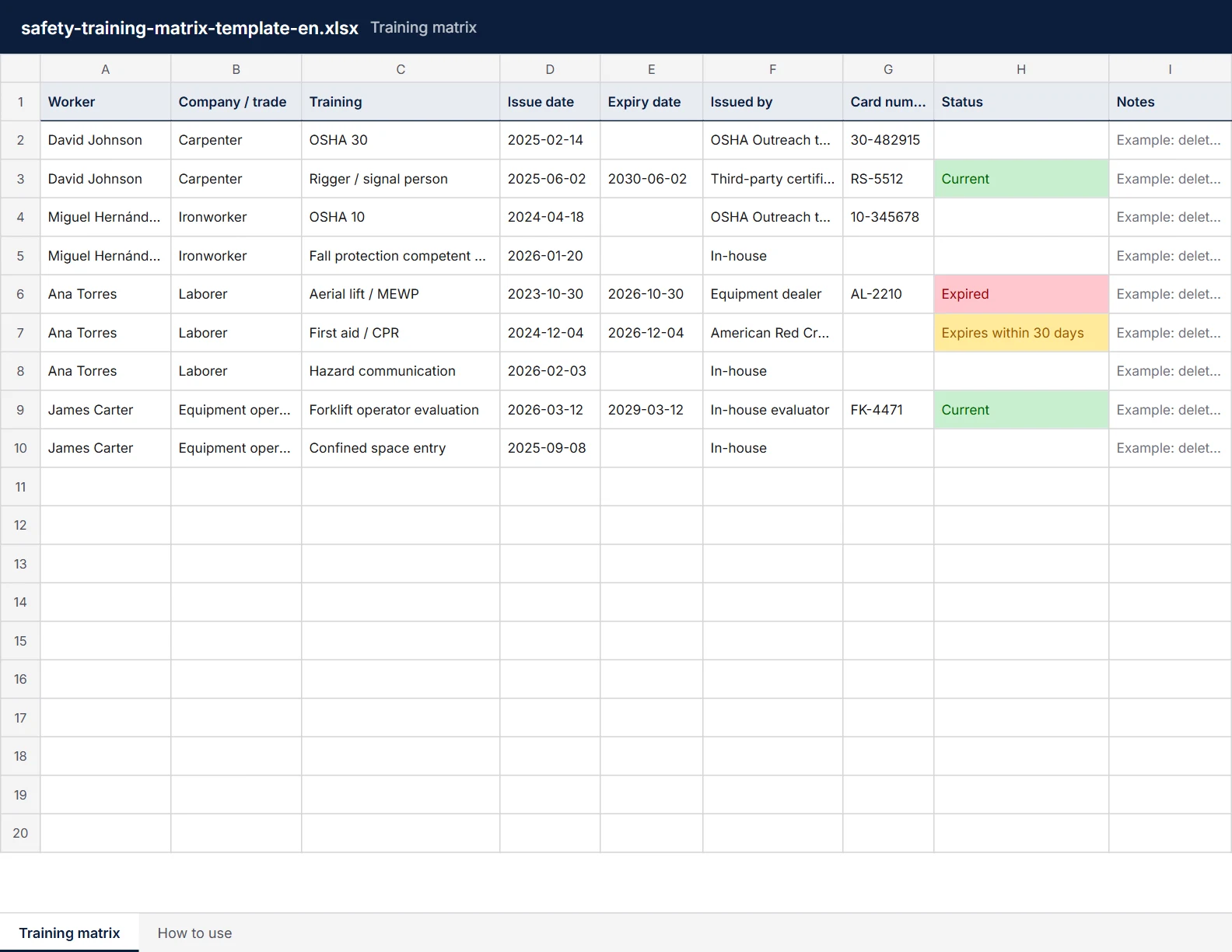
A spreadsheet of who holds which training and when each card expires. One row per card, and a Status column that marks it Expired, Expires within 30 days, or Current. Excel, Google Sheets or paper. Free, no sign-up.
The Excel and CSV files have nine example rows to delete before use. The PDF is one landscape page, US Letter. In Spanish: Excel, CSV, PDF
Already keep a spreadsheet? FieldSafetyTalk imports it and watches the expiry dates for you. See how
What's in the template
The first six columns use the same headings as the FieldSafetyTalk training import, so a filled-in sheet imports as it is. A second tab, How to use, repeats the steps below.
- Worker
- The person's name, as you want it on the record.
- Company / trade
- Who they work for, or their trade. Useful when subcontractors share a site.
- Training
- The card or course, for example OSHA 30 or Aerial lift / MEWP.
- Issue date and expiry date
- As printed on the card, written YYYY-MM-DD. If the card has no expiry date, leave it blank.
- Issued by and card number
- The trainer or provider, and the number on the card, so it can be checked later.
- Status
- Worked out from the expiry date each time the sheet opens: Expired, Expires within 30 days, or Current. A blank expiry date leaves it blank.
- Notes
- Anything else, such as where the original card is kept.
How to use it
Delete the examples
The nine example rows say so in the Notes column. Delete them before you add your crew.
One row per card
A worker with three trainings gets three rows. Copy the dates from the card itself.
Leave blanks blank
If a card has no expiry date, leave the cell empty. Status stays empty too, instead of guessing.
Filter on Status
See what has expired, or expires within 30 days, before you assign the work.
In Google Sheets
Upload the CSV with File > Import, or open the Excel file in Google Sheets. Print the PDF for a paper copy on site.
Or track it in FieldSafetyTalk
Import this sheet as it is: Training records > Import a spreadsheet reads these columns from Excel or CSV, and shows you every row before anything is saved. From then on:
- Expiry flags
- Each card on your crew's training matrix shows Expired, or Expiring when it lapses within 30 days.
- A Monday email
- It lists what expired and what lapses in the next 30 days.
- Hard hat QR stickers
- Print a QR sticker for a hard hat or badge. Scan it to see that worker's training, live. Pro only.
- The whole sheet at once
- Import every row in one go. Spanish, Portuguese and Turkish training names are recognized, and you can match any column by hand.
Free accounts track training for up to 5 workers. Pro is $29/month for unlimited workers and crews.
Frequently asked questions
What is a safety training matrix?
A table of who holds which training and when each card expires. Supervisors use it to check that a crew is qualified for a task before it starts, and to see which cards need renewing.
How often does each training need renewing?
It depends on the training, the rule behind it and who issued the card, so the template doesn't guess. Copy the expiry date from the card. If it has none, leave the cell blank, and check what your site or client requires.
Can I use it in Google Sheets?
Yes. Upload the CSV with File > Import, or open the Excel file in Google Sheets. The PDF is for a paper copy on site.
Will FieldSafetyTalk import my own spreadsheet?
Yes, Excel or CSV. It matches common column names, including Spanish ones, and lets you match any column it doesn't recognize by hand. A date like 03/04/2027, which could be two different days, is flagged for you to settle. Nothing is saved until you confirm the preview.